How the Parser works
The Parser is the front door of a network. You send it a JSON specification, and it validates the spec, converts it into an internal format, and hands it to the right backend service to create a cluster, add a node, register a component, deploy a block, create a vDAG, run a management command or search.
At a glance
Runs on: the management cluster, as parser (NodePort 30500).
You'll use it to: create almost everything in the network.
Key idea: the spec format is pluggable. Use the built-in format (Parser/V1), or define your own with a template and a policy.
What it does
| Capability | Description |
|---|---|
| REST API | One endpoint for every action: create a cluster, add a node, register a component, deploy a block, create a vDAG, run a management command, search. |
| Template-driven parsing | A default format for every spec type. You can replace it with custom templates, linked to policies that validate and transform your own format. |
| Spec Store integration | Reuse saved specifications from the Spec store without re-sending them. |
| Unified search | One query syntax across clusters, nodes, components, blocks and vDAGs. See Search and filter. |
| Task log | Every parse task is recorded in a tasks database, for auditing, history and re-running. |
| Backend integration | Works with the Cluster Controller Gateway, the vDAG processor and the Resource Allocator to carry out each request. |
Architecture
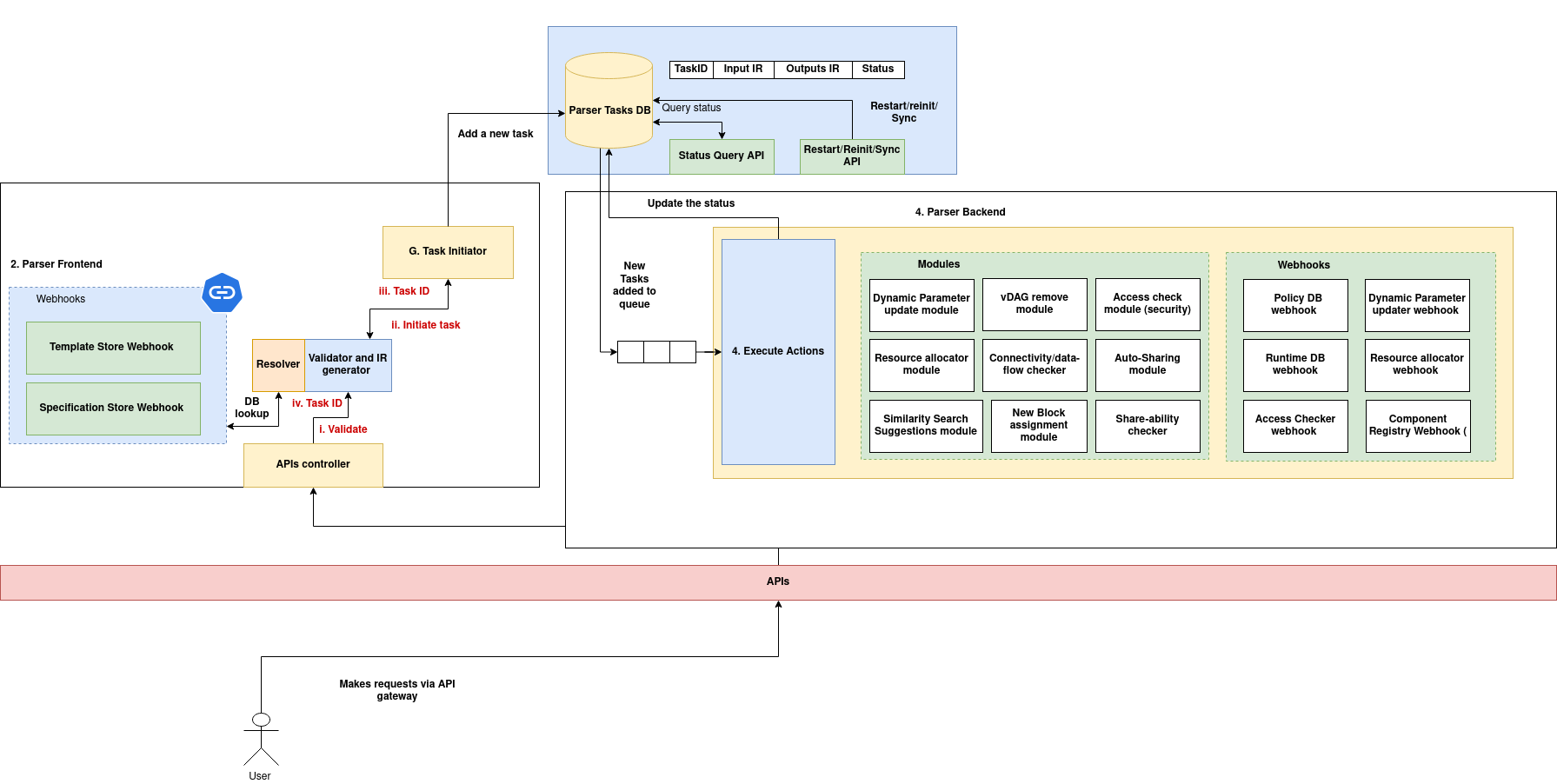
(Download the architecture diagram)
API
The Parser has two endpoints: one takes the spec in the request body, the other loads it from the Spec Store.
Submit a spec
POST /api/<action>: runs <action> with the JSON spec in the request body.
curl -X POST http://<parser-url>/api/createCluster \
  -H "Content-Type: application/json" \
  -d @cluster_spec.json
Use a saved spec
POST /api/with-spec/<action>?specUri=<uri>: loads the spec from the Spec store, then runs <action>.
Actions
| Action | What it does | Spec reference |
|---|---|---|
createCluster |
Registers a new cluster. | Cluster spec |
addNode |
Adds a node to an existing cluster. | Node spec |
addComponent |
Registers a component in the component registry. | Component spec |
createBlock |
Deploys a block from a component. | Block spec |
createvDAG |
Creates a vDAG. | vDAG spec |
executeMgmtCommand |
Runs a management command on a block or cluster. | Management commands |
search |
Finds the best-matching entities using a ranking policy (similarity search). | Search and filter |
filter |
Finds entities that match conditions. | Search and filter |
Spec structure
Every spec is a JSON object with two parts:
| Field | Type | Required | Description |
|---|---|---|---|
header |
object | Yes | How to parse the spec: which template to use, plus optional parameters. |
body |
object | Yes | The spec's content. Its structure depends on the action. |
header fields
| Field | Type | Required | Description |
|---|---|---|---|
templateUri |
string | Yes | Which template to use. "Parser/V1" means the built-in format. Any other value names a custom template. |
parameters |
object | No | Extra parameters passed to a custom template's policy. |
Example (a management command, in the built-in format):
{
  "header": {
    "templateUri": "Parser/V1",
    "parameters": {}
  },
  "body": {
    "spec": {
      "values": {
        "blockId": "block-123",
        "service": "scheduler",
        "mgmtCommand": "restart",
        "mgmtData": {
          "force": true
        }
      }
    }
  }
}
Built-in vs custom templates
- Built-in (
templateUri: "Parser/V1"): the Parser parses the spec itself, using the formats documented in this section. - Custom (any other
templateUri): the Parser looks up the template in the Template store and runs the policy linked to it. The policy converts your format into the Parser's internal representation.
Writing a custom spec parser
You can define your own specification format, for example a simpler one for your users, or one that adds organization-specific validation. A custom format has two parts:
- A template in the Template store, which documents the expected fields.
- A policy that parses specs in that format and returns the Parser's internal representation (IR).
1. Write the parsing policy
The policy's eval() receives the full spec and returns the IR. This example handles executeMgmtCommand specs:
class AIOSv1PolicyRule:
    def __init__(self, rule_id, settings, parameters):
        self.rule_id = rule_id
        self.settings = settings
        self.parameters = parameters

    def eval(self, parameters, input_data, context):
        """
        Converts a custom spec into the internal representation (IR) for executeMgmtCommand.
        """
        try:
            # Read the spec values
            mgmt_data = input_data['body']['spec']['values']

            block_id = mgmt_data.get('blockId')
            service = mgmt_data.get('service')
            mgmt_command = mgmt_data.get('mgmtCommand')
            mgmt_payload = mgmt_data.get('mgmtData', {})

            # Validate
            if not block_id:
                raise ValueError("Missing 'blockId' in the spec.")
            if not service:
                raise ValueError("Missing 'service' in the spec.")
            if not mgmt_command:
                raise ValueError("Missing 'mgmtCommand' in the spec.")

            # Build the internal representation (IR)
            ir = {
                "blockId": block_id,
                "service": service,
                "mgmtCommand": mgmt_command,
                "mgmtData": mgmt_payload
            }
            return ir

        except KeyError as e:
            raise ValueError(f"Missing key in spec: {str(e)}")
        except Exception as e:
            raise RuntimeError(f"Failed to parse spec: {str(e)}")
eval()extracts and validates the fields, then returns a clean IR dictionary.- The Parser passes the IR on to the services that carry out the action.
- Raise errors for missing required fields, so that invalid specs are rejected consistently.
Register the policy with the Policies System to get its policy rule URI. See Policies: preparing a policy for onboarding.
2. Register the template
A template is a TemplateObject:
@dataclass
class TemplateObject:
    templateUri: str = ''
    templatePolicyRuleUri: str = ''
    templateMetadata: Dict[str, str] = field(default_factory=dict)
    templateName: str = ''
    templateDescription: str = ''
    templateVersion: Dict[str, str] = field(default_factory=lambda: {"templateVersion": "", "tag": ""})
    templateTags: List[str] = field(default_factory=list)
    templateData: str = ''
| Field | Description |
|---|---|
templateUri |
Unique ID of the template. Specs use it in header.templateUri. |
templatePolicyRuleUri |
The parsing policy from step 1. |
templateMetadata |
Extra key-value details, for indexing and search. |
templateName |
Human-readable name. |
templateDescription |
What the template is for. |
templateVersion |
Version information (templateVersion, tag). |
templateTags |
Tags, for organizing and searching. |
templateData |
A schema-like description of the expected fields (see below). |
templateData describes what a spec in this format should contain: field types, limits, descriptions and allowed values. It is for documentation and validation; the actual parsing is done by the policy. For example:
{
  "product_id": {
    "type": "string",
    "description": "Unique identifier for the product",
    "pattern": "^[A-Z0-9_-]+$",
    "length": 12
  },
  "price": {
    "type": "number",
    "description": "Retail price of the product",
    "min": 0.01,
    "max": 10000.0
  },
  "dimensions": {
    "type": "object",
    "properties": {
      "width": { "type": "number", "min": 0.0, "max": 1000.0 },
      "height": { "type": "number", "min": 0.0, "max": 1000.0 }
    }
  }
}
Template for the management command parser (template.json)
{
  "templateUri": "ExecuteMgmtCommandTemplate:1.0-stable",
  // the policy rule URI returned when you registered the parsing policy
  "templatePolicyRuleUri": "policies.parsers.mgmt_commands_parser:v1-stable",
  "templateMetadata": {
    "author": "admin",
    "category": "management"
  },
  "templateName": "ExecuteMgmtCommandTemplate",
  "templateDescription": "Template for executing management commands on a block service",
  "templateVersion": {
    "templateVersion": "1.0",
    "tag": "stable"
  },
  "templateTags": ["mgmt", "block", "commands"],
  "templateData": "{\n  \"blockId\": {\n    \"type\": \"string\",\n    \"description\": \"Unique identifier of the block on which the management command will be executed\",\n    \"pattern\": \"^[a-zA-Z0-9_-]+$\"\n  },\n  \"service\": {\n    \"type\": \"string\",\n    \"description\": \"Target service inside the block for command execution\",\n    \"choices\": [\"orchestrator\", \"scheduler\", \"monitor\", \"executor\"]\n  },\n  \"mgmtCommand\": {\n    \"type\": \"string\",\n    \"description\": \"The management command to execute\",\n    \"choices\": [\"restart\", \"updateConfig\", \"scale\", \"healthCheck\"]\n  },\n  \"mgmtData\": {\n    \"type\": \"object\",\n    \"description\": \"Optional payload for the management command\",\n    \"properties\": {\n      \"force\": {\n        \"type\": \"boolean\",\n        \"description\": \"Whether to force the operation if applicable\"\n      },\n      \"config\": {\n        \"type\": \"object\",\n        \"description\": \"Updated configuration values (if applicable)\"\n      }\n    }\n  }\n}"
}
Note
templateData is a JSON-encoded string, not a nested object. Store it as a string.
Register it with the Template store:
curl -X POST http://<template-store-url>/template \
     -H "Content-Type: application/json" \
     -d @./template.json
3. Use it
Set header.templateUri to your template's URI, and write the body in your format:
{
  "header": {
    "templateUri": "ExecuteMgmtCommandTemplate:1.0-stable",
    "parameters": {
        // optional parameters passed to the template's policy
    }
  },
  "body": {
    "spec": {
      "values": {
        "blockId": "block-123",
        "service": "executor",
        "mgmtCommand": "sample-command",
        "mgmtData": {}
      }
    }
  }
}
Submit it with POST /api/executeMgmtCommand as usual.