Third-party systems
Sometimes the best engine for a job already exists, such as vLLM, Triton Inference Server or your own distributed service. Instead of rewriting it as an AIOS instance, you can connect a block to it. The block keeps all its usual services (load balancing, auto-scaling, health checks, metrics, management APIs), while the external system does the actual computation.
At a glance
Who this is for: block creators integrating existing systems.
You'll learn: when to use a third-party system, the two ways to deploy one, and how to write an init container that installs it automatically.
How it works
In a normal block, instances do the work themselves. In a third-party block, instances act as adapters:
- The executor sends a task to an instance, as usual.
- The instance converts the AIOS task into the external system's input format.
- It calls the external system and waits for the result.
- It converts the result back into an AIOS response.
flowchart LR
    C["Client"] --> E["Executor<br/>(load balancer)"]
    E --> I1["Instance<br/>(adapter)"]
    E --> I2["Instance<br/>(adapter)"]
    I1 --> T["Third-party system<br/>(e.g. vLLM, Triton)"]
    I2 --> T
When to use one
- Your application logic is too complex to implement efficiently as an AIOS instance.
- Your application must run across multiple nodes, whereas an AIOS instance is limited to one node.
- Your application is a set of distributed services that manage their own scaling, lifecycle and orchestration, differently from how AIOS works.
Architecture
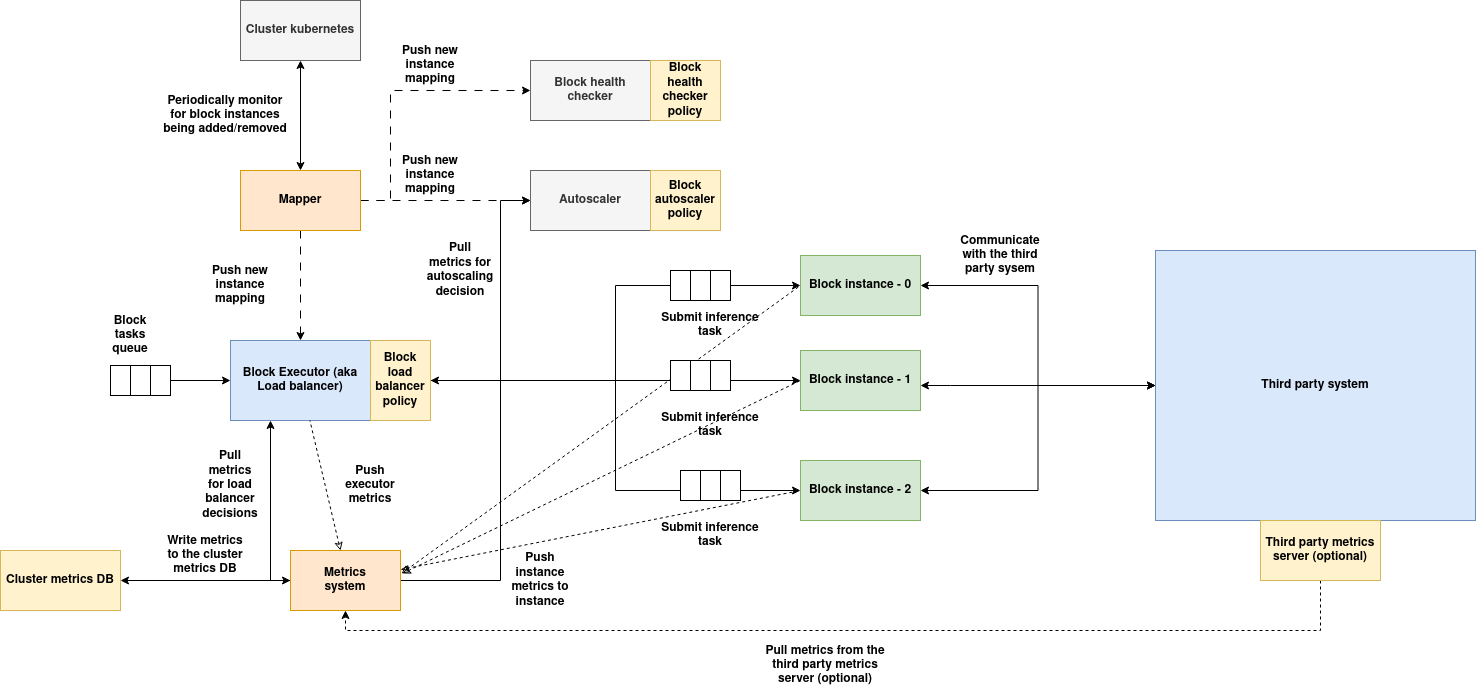
(Download the architecture diagram)
| Component | Role in a third-party block |
|---|---|
| Executor | The block's gateway. It load-balances tasks across instances. It never talks to the external system directly. |
| Mapper | Keeps all block services up to date with the current list of instances. |
| Auto-scaler | Scales the block's instances only. The external system must scale itself, if it supports scaling. |
| Health checker | Polls the instances. Instances must answer on behalf of the external system, so check its health inside your health() method. |
| Metrics | Collected by the executor and instances, and written to the local and global metrics databases. |
| Instances | Your adapter code, built with the Instance SDK. Instances also run vDAG pre- and post-processing policies and push outputs to sidecars. |
| Third-party system | The processing engine. It can run in the same cluster or anywhere on the internet, may use GPUs, and manages its own resources. It can optionally expose a metrics endpoint, which the auto-scaler and load balancer can use for better decisions. |
Note
In both deployment modes below, AIOS does not manage the external system's internal load balancing or auto-scaling.
Two ways to deploy
You deploy and run the external system, in the same cluster or anywhere else. You pass its URL to the block as a parameter, and the block's instances call it.
- Most flexible: can point at any endpoint.
- You handle the external system's lifecycle.
- Example: Quickstart: connect a block to an external vLLM server.
AIOS deploys the external system when the block is created, and removes it when the block is deleted. It does this by running an init container that you provide.
- The external system runs in the same cluster as the block.
- Its URLs are passed to the block automatically.
- You write the install and uninstall logic once, in the init container. See Writing an init container.
| Externally managed | Managed by AIOS | |
|---|---|---|
| Who deploys it | You | AIOS, using your init container |
| Where it runs | Anywhere (same cluster or external) | Same cluster as the block |
| Lifecycle | You manage it | Installed and removed with the block |
| Instance role | Adapter to the external system | Adapter to the locally deployed system |
| Flexibility | High: any endpoint | Limited to the block's cluster |
| Setup effort | Your own external setup | A correctly built init container |
Writing an init container
An init container is a small Python program that installs (or uninstalls) your third-party system. AIOS runs it as a Kubernetes pod:
- when the block is created, with
operating_mode="create" - when the block is removed, with
operating_mode="delete"
The three stages
Your class implements three methods, which run in order. After each one, AIOS records a status update, so you can track progress.
| Stage | Method | Typical work | Returns |
|---|---|---|---|
| 1 | begin() |
Preparation: connect to Kubernetes, validate resources, create directories. | (success: bool, message) |
| 2 | main() |
The core work: install the system (create) or uninstall it (delete). | (success: bool, message or dict) |
| 3 | finish() |
Final steps: clean up, and return the URLs the block needs. | (success: bool, dict) |
If any stage returns failure or raises an exception, AIOS records a "failed" status and stops.
class SampleContainerClass:
    def __init__(self, envs, block_data, cluster_data, k8s, operating_mode="create"):
        ...

    def begin(self):
        return True, "Initialization successful."

    def main(self):
        # custom data can be sent as status
        return True, {}

    def finish(self):
        # custom data can be sent as status
        return True, {
            # for example: the URL the block should send work to
            "server_url": "<url of the server>",
            # for example: the URL to pull the system's metrics from (optional)
            "metrics_url": "<url of the metrics url>"
        }
Your class receives these constructor arguments:
| Argument | Description |
|---|---|
envs |
Environment variables, as a dictionary. |
block_data |
The block's record from the blocks database. |
cluster_data |
The cluster's record. |
k8s |
A K8sConnection for talking to the Kubernetes API. |
operating_mode |
"create" or "delete". |
Run it
The entry point of your container calls execute_init_container with your class:
Behind the scenes, the InitContainerExecutor:
- reads environment variables (
get_envs()) - loads the block and cluster records (
BlocksDB().get_block_by_id(...),ClusterClient().read_cluster(...)) - opens a Kubernetes connection (
K8sConnection) and a cluster controller client (ClusterController) - creates your class with the arguments above
- calls
begin(),main()andfinish()in order, sending a status update to the cluster controller after each one
If initialization fails, an exception is raised immediately. If the process hits an unhandled exception, it exits.
Attach it to your component
Name the init container in your component specification. See Component spec with init container. Then create the block as usual.
Helper classes
The init container framework includes two helpers for the most common tasks.
K8sConnection
Connects to the Kubernetes API. It first tries the in-cluster configuration, then falls back to ~/.kube/config, and raises K8sConnectionError if both fail.
| Method | Description |
|---|---|
connect() |
Opens the connection. |
get_api_client() |
Returns a client.ApiClient for building API objects such as CoreV1Api and AppsV1Api. |
k8s = K8sConnection()
k8s.connect()

core_v1 = client.CoreV1Api(k8s.get_api_client())
pods = core_v1.list_namespaced_pod(namespace="default")
Use it to create, read or delete Kubernetes resources, query cluster state, or watch the pods of your third-party system.
HelmSubprocess
Runs helm CLI commands. Pass a custom binary path to the constructor if helm is not on the PATH: HelmSubprocess(helm_command='helm').
| Method | Description |
|---|---|
run_helm_command(args: List[str]) |
Runs Helm with a list of arguments. Returns standard output; raises HelmSubprocessError on failure. |
run_helm_command_string(arg_string: str) |
Same, but takes one string, split with shlex.split(). |
helm = HelmSubprocess()

# Using a list of arguments
helm.run_helm_command(["install", "my-release", "my-chart", "--namespace", "third-party"])

# Using a string
helm.run_helm_command_string("install my-release my-chart --namespace third-party")
Use it to install, upgrade, roll back or uninstall Helm charts, or to query release status.
Recommendations
- Validate Helm chart inputs and outputs during development.
- Use consistent release names, so that upgrades and uninstalls behave predictably.
- Log command output and errors; they help when debugging and tracking block status.
Example: install Triton Inference Server with Helm
This init container installs a Triton Inference Server Helm chart when the block is created, and uninstalls it when the block is removed. In finish(), it returns the URLs the block will use.
import logging
from k8s_connection import K8sConnection
from helm_subprocess import HelmSubprocess
from typing import Dict

class ThirdPartyServiceInitContainer:
    def __init__(self, envs: Dict, block_data: Dict, cluster_data: Dict, k8s: K8sConnection, operating_mode="create"):
        self.envs = envs
        self.block_data = block_data
        self.cluster_data = cluster_data
        self.k8s = k8s
        self.operating_mode = operating_mode
        self.helm = HelmSubprocess()
        self.release_name = f"{block_data.get('block_id', 'default-block')}-triton"
        self.namespace = "third-party"
        self.chart_path = envs.get("helm_chart_path", "./charts/triton-inference-server")

    def begin(self):
        logging.info("Running begin() step of init container.")
        try:
            self.k8s.connect()
            logging.info("Kubernetes client initialized successfully.")
            return True, "Kubernetes client initialized"
        except Exception as e:
            logging.error(f"Error during begin(): {e}")
            return False, f"Kubernetes connection error: {str(e)}"

    def main(self):
        logging.info(f"Running main() step in {self.operating_mode} mode.")

        try:
            if self.operating_mode == "create":
                self.helm.run_helm_command([
                    "install", self.release_name, self.chart_path,
                    "--namespace", self.namespace,
                    "--create-namespace"
                ])
                message = f"Triton Inference Server '{self.release_name}' installed successfully."

            elif self.operating_mode == "delete":
                self.helm.run_helm_command([
                    "uninstall", self.release_name,
                    "--namespace", self.namespace
                ])
                message = f"Triton Inference Server '{self.release_name}' uninstalled successfully."

            else:
                raise ValueError(f"Unknown operating mode: {self.operating_mode}")

            logging.info(message)
            return True, message

        except Exception as e:
            logging.error(f"Error during main() in {self.operating_mode} mode: {e}")
            return False, str(e)

    def finish(self):
        logging.info("Running finish() step of init container.")
        try:
            # Construct internal cluster URLs
            service_name = f"{self.release_name}-service"
            dns_base = f"{service_name}.{self.namespace}.svc.cluster.local"

            result = {
                "inference_url": f"http://{dns_base}:8000/v2/models",
                "metrics_url": f"http://{dns_base}:8002/metrics"
            }

            logging.info(f"Finish step completed. Service DNS: {dns_base}")
            return True, result

        except Exception as e:
            logging.error(f"Error during finish(): {e}")
            return False, {"error": str(e)}
Accessing the third-party system endpoints inside block services
Whatever your init container's finish() returns is saved in the block's record, under blockInitData.initContainer:
{
    ...
    "blockInitData": {
        "initContainer": {
            // for example:
            "inference_url": "http://tensorrt-inference-server.third-party.svc.cluster.local:8000/v2/models",
            "metrics_url": "http://tensorrt-inference-server.third-party.svc.cluster.local:8002/v2/models"
        }
    },
    ...
}
The block record is passed to all of the block's services (instances, load balancer, auto-scaler and health checker), so all of them can use these URLs. Return any URLs or details your services will need.
For example, an auto-scaling policy can read the external system's metrics:
# in the eval method:
block_data = input_data["block_data"]
init_container_data = block_data["blockInitData"]["initContainer"]

response = requests.get(init_container_data["metrics_url"])

# process the response here
Your instance code can read the same values from context.block_init_data.
Tracking init container status
AIOS records the progress of each block's init container:
@dataclass
class InitContainerEntry:
    # Same as the block ID
    id: str = field(default_factory=lambda: str(uuid.uuid4()))

    # Data about the block this init container run belongs to
    # (typically the block ID, name and other details from BlocksDB)
    block_data: Dict[str, Any] = field(default_factory=dict)

    # Details of the execution: logs, return messages or outputs from each stage
    status_data: Dict[str, Any] = field(default_factory=dict)

    # Current stage:
    #   "begin"  - preparation in progress or done
    #   "main"   - main deployment logic in progress or done
    #   "finish" - final steps in progress or done
    #   "failed" - one of the stages failed
    status: str = ''
Query it through the Cluster Controller Gateway with a MongoDB-style query. <cluster_id> is the cluster where the block, and so the init container, runs.
POST /initContainer/queryInitContainerData/<cluster_id>
curl -X POST http://<server-url>/initContainer/queryInitContainerData/<cluster_id> \
     -H "Content-Type: application/json" \
     -d '{
           "status": "failed"
         }'
A more specific query:
The response is a list of matching entries.