Key concepts
This page explains the building blocks of AIGr.id and how they relate to each other. Read it once from top to bottom: each concept builds on the one before it. If you only need a quick definition, see the Glossary.
The big picture
AIGr.id has two halves:
- Infrastructure. Where things run: networks, clusters and nodes.
- Workloads. What runs: components, blocks and vDAGs.
Policies connect the two by deciding how everything behaves.
flowchart TB
    subgraph Infrastructure
        NET["Network<br/>(governed by a management cluster)"] --> CL1["Cluster A"]
        NET --> CL2["Cluster B"]
        CL1 --> N1["Node"]
        CL1 --> N2["Node"]
        CL2 --> N3["Node"]
    end
    subgraph Workloads
        COMP["Component<br/>(packaged code + spec)"] -->|instantiated as| BLK["Block<br/>(running, scalable service)"]
        BLK -->|composed into| VDAG["vDAG<br/>(workflow of blocks)"]
    end
    BLK -. "runs on" .-> CL1
    POL{{"Policies<br/>(Python rules)"}} -. "govern" .-> NET
POL -. "govern" .-> BLK| Concept | In one line |
|---|---|
| Network | A group of clusters that follow the same rules, run by one management cluster. |
| Cluster | A Kubernetes cluster that has joined a network and contributes its machines. |
| Node | A single machine (with or without GPUs) inside a cluster. |
| Policy | A small Python program that customizes a decision anywhere in the system. |
| Component | A packaged, versioned piece of AI or compute code, ready to be deployed. |
| Block | A running deployment of a component: scalable, load balanced and health checked. |
| vDAG | A workflow that chains several blocks together, possibly across clusters. |
| App layout and scale layout | The logical design of an AI application, and how it is physically deployed. |
| Third-party system | An external system (for example vLLM) that a block delegates work to. |
Network
In short
A network, also called a grid, is a collection of clusters governed by a single management cluster.
The management cluster is the network's governing body. It decides:
- which clusters may join the network
- which nodes may be added to those clusters
- which workloads (blocks) may be scheduled
- which management commands may be run on clusters and blocks
A network can, in principle, hold an unlimited number of clusters, unless its governing policy sets a limit.
How governance works. Rules are attached as pre-check policies to the APIs of the Cluster Controller Gateway. Every time someone calls one of these APIs, for example to add a cluster, the matching policy runs on the request. The policy can allow the action, reject it, or modify the request before it proceeds.
To create a network, you first set up its management cluster: see Create a network.
Services in the management cluster
| Service | What it does |
|---|---|
| Parser | The front door for creating things. You submit a JSON specification, and the Parser creates the block, vDAG, cluster or registry entry. It ships with a standard spec format, and you can define your own through templates and policies. |
| Cluster Controller Gateway | Manages all clusters in the network. It sets up cluster infrastructure, schedules blocks together with each cluster's controller, relays management commands, and enforces the network's pre-check policies. |
| Resource Allocator | Runs resource allocation policies to pick the best cluster, node and GPUs for a block. You can also use it for a "dry run" to see where something would be placed. |
| Policies System | Stores, finds and runs policies, either in-process or deployed as jobs, functions or graphs. |
| Registries | Databases that record what exists in the network: clusters, blocks, vDAGs, components, assets, container images, specs and more. |
Cluster
In short
A cluster is a Kubernetes cluster that has joined a network. It belongs to exactly one network at a time.
A cluster can be a data-center cluster, a small home-built cluster or a managed Kubernetes cluster on a cloud such as AWS or GCP. Clusters can be added to or removed from the network at any time.
When a cluster joins, the Cluster Controller Gateway automatically installs the services the cluster needs:
| Service | What it does |
|---|---|
| Cluster Controller | Manages the cluster. Like the network, it can enforce its own pre-check policies on which nodes may join, which blocks may be scheduled and which management commands are allowed. |
| Local metrics database | Stores and indexes metrics for this cluster, from blocks and from node hardware. Cluster and block policies read these metrics to make decisions. |
| Optional add-ons | A cluster can also host a container registry, an assets registry, a policy executor or an inference server, and list them in the network's registries so others can use them. See Deploy add-on services. |
To join a cluster to a network, see Join a cluster.
Node
In short
A node is one machine in a cluster. It is the basic unit of compute.
Anyone with spare compute can join a node to one of the available clusters and add it to the shared pool. Nodes can be very different from each other: a small NUC, a server in a data-center rack, or a cloud VM. A node may have no GPUs or several.
- Workloads run on nodes as instances. One node can run several instances of the same block, or instances of different blocks.
- GPUs can be shared. Several instances can time-share one GPU.
- Every node runs a metrics collector (a Kubernetes DaemonSet in host mode). It periodically reads system resources, including GPUs, and reports them to the cluster's metrics database. See Node metrics DaemonSets.
To join a node, see Join a node.
Policy
In short
A policy is a piece of Python code that the system loads and runs at a specific decision point, so that you can customize its behavior.
Policies make AIOS a general-purpose platform. Instead of hard-coding rules such as "how to load-balance" or "who may join", AIOS asks a policy. Policies decide, among other things:
- whether a cluster, node or block may be added (governance)
- which cluster, node and GPU a block runs on (allocation)
- how requests are spread across instances (load balancing)
- when to add or remove instances (auto-scaling)
- whether instances are healthy (health checks)
- how much a user may call a workflow (quotas)
- how data is transformed between workflow steps (pre- and post-processing)
Five ways to run a policy
The same policy code can be executed in five ways, depending on how heavy it is and whether it needs to keep state.
| Type | How it runs | Keeps state? | How you talk to it | Scaling | Fault tolerance |
|---|---|---|---|---|---|
| Type 1: In-process | Loaded into another AIOS service's own process using the Local Policy Evaluation SDK. | Up to the host application | In-process memory | Managed by the host application | Same as the host application |
| Type 2: Central executor | Sent to a shared policy executor, which runs it and returns the result. | No | REST API over HTTP | The executor can scale with load | Same as the executor |
| Type 3: Remote job | Deployed once as a Kubernetes Job on a remote cluster that has a policy executor. Good for heavy one-off work or collecting data about that cluster. | No | None while running: you wait for the result | Not applicable | Kubernetes |
| Type 4: Online function | Deployed as a long-running pod that is initialized once and called repeatedly. | Yes | REST API over HTTP | Autoscaling rules set at creation | Kubernetes |
| Type 5: Policy graph | A predefined DAG of Type 4 functions, stored in a registry and run by graph ID. | Yes, per node | Orchestrated by the Policies System | Each node scales independently | Kubernetes |
Note
Types 2 and 3 can only be used for stateless policies. If your policy must remember things between calls and run remotely, use Type 4.
Learn to write and deploy policies in Policies.
Component
In short
A component is a packaged, versioned piece of software, plus the metadata needed to deploy it as a block.
A component is the "recipe" from which blocks are created. The typical workflow:
- Write your model server or application with the AIOS Instance SDK.
- Build a container image using
aios_instance:v1as the base image. - Push the image to a container registry: your own, an external one, or one provided by the network.
- Write a component specification that describes the image, and register it.
A component specification contains:
- Name and version. From these, AIOS generates a unique
componentURI. You use this URI when creating a block. - Metadata, such as author name and contact details.
- Container images for the main instance, plus any sidecars and init containers.
- Defaults for settings and parameters.
- Protocols: the expected structure of inputs, outputs, settings, parameters and management commands.
Components are stored in the Component registry, which you can search. For the full specification format, see Component spec.
Block
In short
A block is a running deployment of a component. It serves AI inference, or any computation, and manages its own scaling, load balancing and health.
A block can be scheduled on any cluster in the network that meets its resource requirements. A block can span multiple nodes within one cluster, but cannot span clusters. To spread work across clusters, connect several blocks with a vDAG.
What a block does for you
- Runs one or more instances of your workload.
- Starts a load balancer (the executor) that spreads incoming tasks across instances, using a load-balancing policy you choose.
- Runs an auto-scaler sidecar that watches the instances and adds or removes them, using an auto-scaling policy you choose.
- Runs a health checker sidecar that polls instances and applies your health-check policy.
- Exposes APIs for management commands, so you can change configuration or query the auto-scaling and load-balancing policies, and for metrics.
- Exposes the block's inference API to the outside world through a gRPC proxy and the cluster's ingress.
Architecture
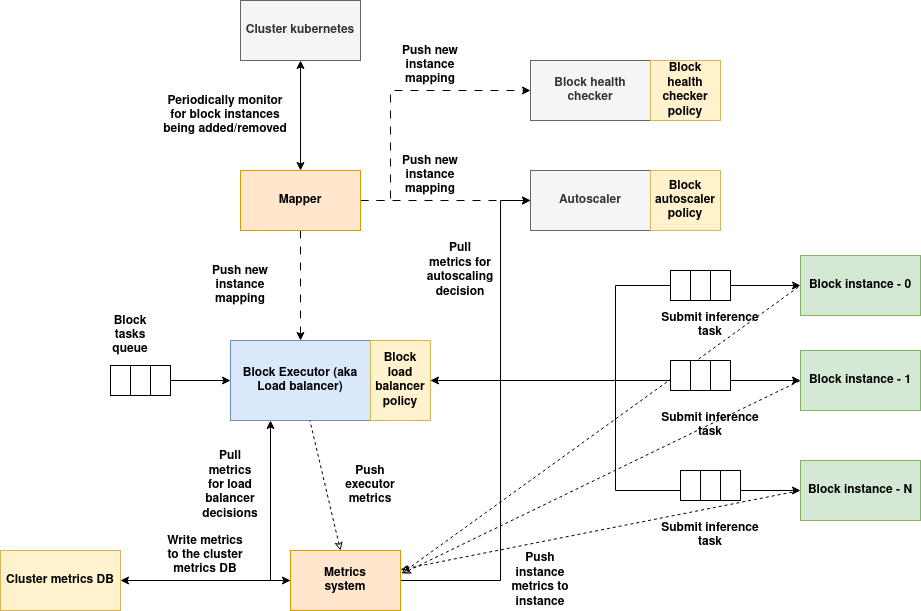
(Download the architecture diagram)
| Service | Role |
|---|---|
| Executor | The block's gateway. It load-balances incoming tasks across instances using the load-balancer policy, and reports executor metrics. |
| Mapper | Watches for instances being added or removed and tells all of the block's services about the current set. |
| Auto-scaler | Periodically reads instance metrics and runs the auto-scaling policy to decide whether to scale up or down. |
| Health checker | Periodically calls every instance's health endpoint, runs the health-check policy, and acts on any problems found. |
| Metrics | Collected by the executor and instances, and written to the cluster's local metrics database and the network's global metrics databases. |
| Instances | Your container, built with the AIOS Instance SDK. Instances run any pre- and post-processing policies for vDAG tasks and can forward output to sidecars. |
For a deeper look, see Block runtime.
vDAG
In short
A vDAG (virtual Directed Acyclic Graph) is a workflow defined over blocks that are already running, anywhere in the network.
Each node in a vDAG points to a block or to another vDAG, so you can nest workflows. Because the blocks can live on different clusters, one vDAG can span the whole network, with each block scaled independently.
A node can be pinned to a specific block, or an assignment policy can search the available blocks and pick the most suitable one when the vDAG is created.
A block can serve several vDAGs at the same time, and still accept direct (ad-hoc) inference requests.
vDAG features
- Sub-graphs. A node can reference another existing vDAG.
- Cross-cluster. A graph can span blocks in one cluster or many.
- Smart assignment. An assignment policy can choose the right block for each node.
- Conditional routing. A post-processing policy can choose between several paths.
- Custom transforms. Pre- and post-processing policies run before and after each node's inference, inside the block's instance.
- Flexible shapes. Many-to-one and one-to-many connections enable multiplexing, ensembles and branching.
vDAG controller
Creating a vDAG does not make it callable. To serve it, you deploy a vDAG controller, the gateway that users send vDAG tasks to. The controller:
- Accepts tasks, runs them through the graph and returns results.
- Enforces quotas and rate limits per session or globally, through a quota policy.
- Monitors the health of every block in the graph, through a health-check policy.
- Runs periodic quality checks that compare outputs to inputs. These checks can send samples to an external QA system or for manual audit.
- Exposes APIs for management commands for the policies above.
- Reports metrics such as latency and throughput.
See vDAG spec and vDAG controller.
Master DAG
The master DAG is the logical graph you get by overlaying every vDAG currently running in the network on top of the blocks they use. It is a whole-network view of how blocks are being used together at a given moment.
App layout and scale layout
These two ideas separate what an AI application does from how and where it is deployed.
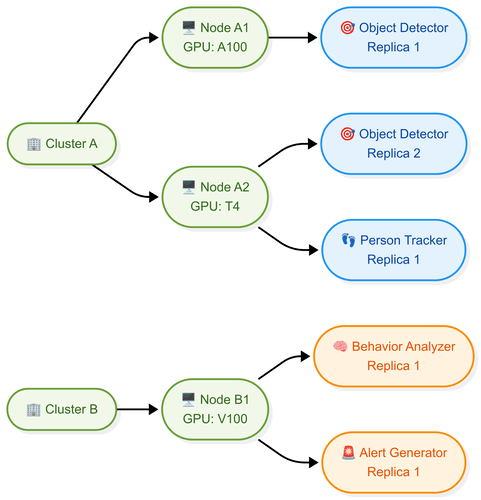
The app layout is the high-level design of an AI use case.
- It is expressed as a vDAG: each node is a functional block, and each edge is a flow of data or control.
- It describes what each block does (model inference, preprocessing, decision logic) and how blocks connect: sequence, routing and coordination.
- It says nothing about hardware: not how many replicas run, nor which cluster, node or GPU they use. So the design stays the same when infrastructure changes.

The scale layout is how the app layout is realized on real infrastructure.
- It maps each logical block to resources: which cluster, which node, which GPUs or CPUs, and how many replicas.
- It enables performance tuning: more replicas or faster GPUs for the blocks that need them, to meet latency, throughput or cost targets.
- It supports multi-cluster, heterogeneous deployment across regions and providers.
- It is a separate layer, so operators can scale blocks up or down without changing the logical workflow.
Third-party system
In short
A block can hand its actual computation to an external system, such as a vLLM inference server, instead of doing it inside its own instances.
Normally a block's instances do the work themselves. With a third-party system, the block keeps its usual management services (executor, auto-scaler, health checker, metrics), but its instances act as adapters. Each instance converts an AIOS task into the external system's format, calls the external system, and converts the response back.
When to use one
- Your application logic is too complex to implement efficiently as an AIOS instance.
- Your application must run across multiple nodes, whereas an AIOS instance is limited to one node.
- Your application is a set of distributed services that manage their own scaling, lifecycle and orchestration.
Two ways to deploy it
| Externally managed | Managed by AIOS | |
|---|---|---|
| Who deploys it | You, separately | AIOS, by running an init container you provide |
| Where it runs | Anywhere: same cluster or elsewhere on the internet | Same cluster as the block |
| Lifecycle | You manage it | AIOS installs it with the block and uninstalls it when the block is removed |
| How the block finds it | You pass its URL as a block parameter | Its URL is passed to the block automatically |
| Flexibility | High: can point at any endpoint | Limited to the block's cluster |
| Setup effort | Your own external setup | A correctly built init container |
Things to know
- The auto-scaler scales the block's instances, not the external system. The external system must scale itself if needed.
- The block's instances must answer health checks on behalf of the external system.
- The external system manages its own resources, including GPUs. It may expose a metrics endpoint so that the auto-scaler and load balancer can make better decisions.
See Third-party systems for the architecture and the init container SDK.
Next steps
- See how all the services fit together: Architecture
- Try it hands-on: Quickstart tutorial
- Find the guide for your role: Guides by role